A Guide To The Modern Ecommerce Search Engine


Your ecommerce search engine is the most powerful salesperson you have.
Too many store owners pour their time and money into fancy navigation menus and beautiful category pages, only to watch visitors ignore them completely. A huge chunk of your audience shows up already knowing what they want, and their first move is a beeline for the search bar.
These aren't just casual browsers. These are your high-intent shoppers, and they're telling you exactly what they want to buy.
Your Search Bar is Your Best Salesperson
The data on this is crystal clear. Research shows that up to 43% of visitors on a retail site head straight for the search bar.
Even more important? People who use search are 2 to 3 times more likely to convert than those who don't. That number, from research highlighted by wizzy.ai, draws a straight line between a great search experience and more money in your pocket.
The Real Cost of a Bad Search Experience
When a customer searches for a product and gets a "no results found" page, it's not a minor hiccup. It's a lost sale, right there.
A slow, clunky, or just plain wrong search result creates friction. It erodes trust. This gets even worse on mobile, where patience is thin and people expect instant, perfect answers. Every second of delay, every irrelevant suggestion, is an open invitation for them to leave and buy from your competitor.
Here’s what a modern, effective search experience looks like. It gives instant, relevant results as the user types, turning the search box into an interactive shopping assistant.
This kind of dynamic, real-time feedback isn't a luxury anymore. It's the standard.
Connecting Search to Real Revenue Growth
Fixing your on-site search isn't just a tech task—it's a core part of your sales strategy. The return on investment here is one of the highest you can get, because it has a direct, immediate impact on your bottom line.
Key Takeaway: Improving site search isn't about user experience fluff. It’s about converting high-intent traffic that is already on your site, ready to buy.
You can find more strategies for improving your site's performance in our guides on landing page conversion rate optimization. And as the evolving landscape of AI commerce shows—with users now able to shop directly inside ChatGPT—intelligent, sophisticated search is becoming non-negotiable for anyone serious about selling online.
Choosing Your Search Technology: Hosted vs. Self-Hosted
Your first big decision is picking your search tech: do you go with a hosted service or host it yourself? This isn't just a technical detail—it fundamentally shapes your setup time, ongoing maintenance, and how much control you have. Think of it as the difference between renting a fully furnished apartment versus building your own house from the ground up.
A hosted solution, often called SaaS (Software as a Service), is the rental. You pay a company like Algolia a monthly fee, and they handle everything—the servers, the security patches, the uptime. This path is built for speed. You can launch a seriously powerful search experience fast, without needing a team of engineers to babysit servers.
Self-hosting is the build-it-yourself route. You grab an open-source engine like MeiliSearch or Elasticsearch and install it on your own infrastructure. This gives you absolute control over your data and opens the door for deep, specific customizations. If you have the in-house tech skills, it can be more cost-effective in the long run.
The Core Tradeoffs
The right choice comes down to your team's resources and priorities. A hosted ecommerce search engine is a no-brainer for teams that want to move fast and focus on their products, not server administration. It’s a predictable monthly cost that delivers results almost immediately.
On the flip side, self-hosting is a better fit for businesses with developers on staff who need granular control or have strict data residency requirements. The software might be free, but you're on the hook for the "hidden" costs—server resources, urgent updates, and troubleshooting when things go wrong.
Don't underestimate how much this decision matters. Getting users to the right product quickly is a direct lever for revenue. As you can see below, shoppers who use site search are signaling a much higher intent to buy.
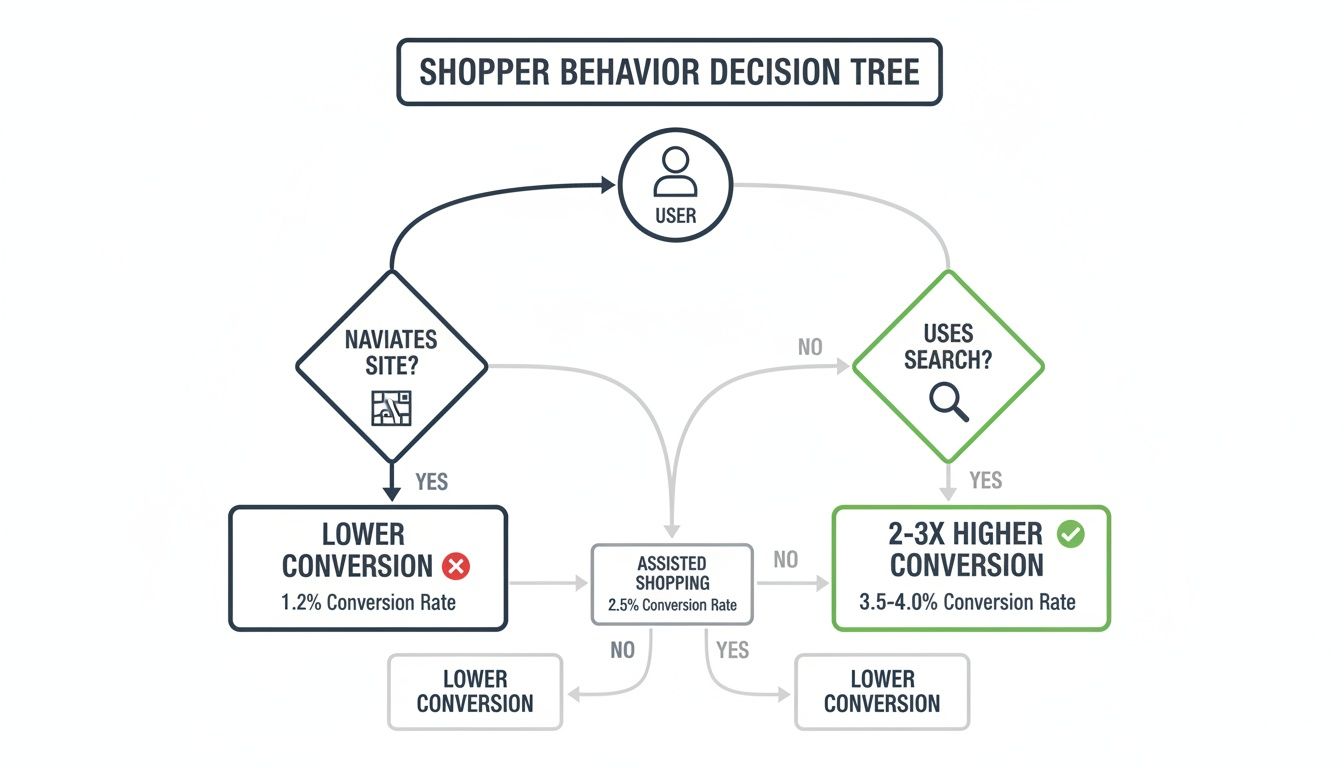
This isn't just a nice-to-have feature; it's a critical part of your conversion funnel.
Comparing Your Options Side-By-Side
To make this choice more concrete, let's lay it all out. This isn't just about features; it's about what each model demands from your business in terms of time, money, and skill.
Here's a quick comparison to help you decide which path makes the most sense for your store.
Hosted vs. Self-Hosted Ecommerce Search Engine Comparison
This table breaks down the key differences between a hosted service and a self-hosted engine to help you choose the right search solution based on your technical expertise, budget, and scalability needs.
| Factor | Hosted Search (e.g., Algolia) | Self-Hosted Search (e.g., MeiliSearch) |
|---|---|---|
| Setup Time | Fast. You can get a basic implementation live on platforms like Shopify in under an hour. | Slower. Requires server provisioning, software installation, and manual configuration. |
| Maintenance | Minimal. The provider handles all updates, security, and uptime. You just use the service. | High. Your team is fully responsible for all server management, patches, and software updates. |
| Scalability | Easy. It scales automatically with your traffic. Your bill might go up, but the infrastructure just works. | Manual. You have to provision and manage more powerful servers yourself as you grow. |
| Customization | Good. Offers extensive API and dashboard controls that cover most ecommerce use cases. | Excellent. You get total control over the source code for deep, unique integrations. |
| Cost Structure | Predictable monthly subscription based on usage (e.g., searches, records). | Variable operational costs for servers, plus the cost of your developer's time. |
Ultimately, the best option is the one that aligns with your team's strengths. If you're lean and focused on growth, a hosted solution lets you punch above your weight. If you have a solid engineering team and need total control, self-hosting gives you the keys to the kingdom.
Launch A Better Search Experience In Under An Hour
Feeling the pressure to get results, like, yesterday? Good news. It’s entirely possible to get a powerful hosted ecommerce search engine live on your Shopify or Webflow store in about 60 minutes.
This isn't about becoming a search guru overnight. It's about giving your customers a radically better experience today. The goal is immediate improvement. By using a hosted solution, you get to skip all the server configuration headaches and jump straight to the parts that actually matter—syncing your products and tweaking the UI.
The Quick-Start Workflow
Getting up and running with a hosted provider like Algolia follows a pretty straightforward path. The entire process is built for speed, making it accessible even if you're not a developer.
Here’s the basic playbook you'll follow:
- Sign Up & Create an Application: First, you’ll create an account. You'll then spin up a new "application," which is just a container for your search data and all its settings.
- Create Your First Index: Think of an index as a database table built specifically for search. You’ll make one called something obvious like
productsto hold your entire catalog. - Sync Your Product Catalog: This is the most important step. For a platform like Shopify, you can use an official integration app that handles everything automatically. If you're on Webflow, you'll likely use a pre-built script or a third-party connector to push your CMS items into the index.
- Embed the Search UI: Last, you just add a few lines of JavaScript to your site's theme. This snippet replaces your old, clunky search bar with the new, supercharged one and renders the search results page.
Honestly, you can knock this out in a single sitting. The main lifts—product syncing and front-end integration—are almost always streamlined with pre-built tools and great documentation.
Key Insight: You don't need to perfect every single setting on day one. Just getting the initial setup live is a massive upgrade over native search. You can fine-tune everything later once you have real user data to analyze.
Here's what a modern dashboard looks like, where you'll be managing your settings.

The interface is designed to guide you through creating an index and syncing your product data with as little friction as possible.
From Sign-Up To Go-Live
Let's walk through a real-world example. Imagine you run a clothing store on Shopify.
You sign up for Algolia, install their official Shopify app from the app store, and connect your account. The moment you do, the app automatically starts indexing all your products—titles, descriptions, tags, variants, everything.
While that sync is running in the background, you can hop over to their UI library and grab the code snippet for the front-end components. You’ll paste this into your theme's theme.liquid file.
Within an hour, your store now has a lightning-fast, typo-tolerant search bar that shows instant results, complete with product images and prices, as customers type. That’s it. You're live.
Fine-Tuning Search To Maximize Conversions
Getting your ecommerce search engine live is a huge win, but it's just the starting line. Now it’s time to make it smart. A basic search bar finds products; a fine-tuned search engine sells them by understanding what your customers actually want and steering them toward your most important products.
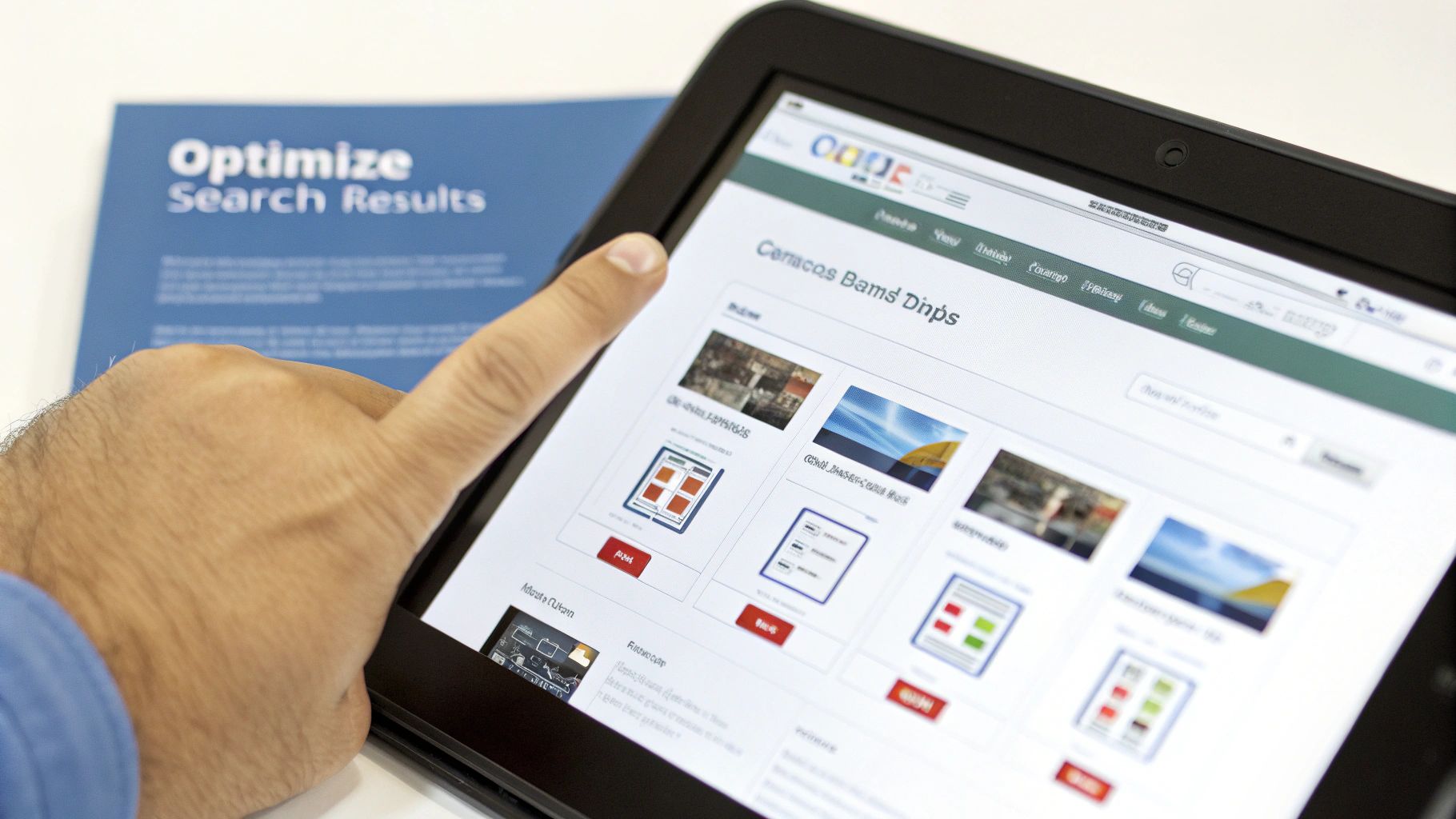
This all comes down to dialing in three critical areas: your ranking logic, faceted search, and typo tolerance. Get these right, and you turn a functional search bar into a genuine conversion machine that guides customers to the perfect product, even when they don’t know exactly what they’re looking for.
Defining Your Ranking Logic
Right out of the box, most search engines rank results by text relevance—how well a query matches the product title and description. It’s a decent start, but it’s not a sales strategy. You need to tell your search engine what you value most.
This is where custom ranking rules come in. You can inject your own business metrics into the search algorithm, effectively teaching it to prioritize results based on what really matters to your bottom line.
A few powerful examples include:
- Sales Velocity: Boost products that are already selling well. This creates a positive feedback loop, showing your most popular items to more people.
- Profit Margin: Give a little extra weight to products with higher margins to increase profitability from every search-driven sale.
- New Arrivals: Give new items a temporary boost to make sure they get seen, helping them gain that crucial initial traction.
- Inventory Level: Push products with high stock to move inventory faster, or even down-rank items that are nearly sold out to prevent customer frustration.
By layering these rules, you create a sophisticated ranking formula. For example, your primary rule could be text relevance, followed by sales velocity, and then profit margin as a tie-breaker. You'll want to analyze your sales data to make these calls, and our guide on using Google Analytics for small business provides a solid foundation for finding that data.
Empowering Customers with Faceted Search
Faceted search—you know it as filtering—is completely non-negotiable for any serious ecommerce store. It lets shoppers take a huge, overwhelming set of results and narrow it down by clicking on specific attributes. Imagine searching for "laptops" and getting back 500 results; without filters for screen size, RAM, or brand, your customer is completely lost.
Implementing facets is a matter of telling your search index which product attributes are "filterable." The trick is to choose attributes that are genuinely helpful for making a decision in your specific category.
Pro Tip: Don't just turn every attribute into a filter. A cluttered filter sidebar is just as useless as having no filters at all. Stick to the top 5-7 attributes your customers actually care about.
For a clothing store, this would probably be:
- Size
- Color
- Brand
- Price Range
- Material
For an electronics store, it might look more like this:
- Brand
- Screen Size
- Storage Capacity
- Customer Rating
These facets turn a frustrating hunt into an efficient discovery process, which dramatically increases the odds of a conversion.
Mastering Typo Tolerance
People make mistakes. They misspell brand names, use slang, or just type too fast. A rigid search engine that doesn't account for this will return that dreaded "no results found" page, killing a potential sale instantly.
Modern search tools have built-in typo tolerance, but you can—and absolutely should—fine-tune it. The goal is to be forgiving without returning nonsensical results. Most platforms let you configure settings like the number of acceptable typos based on how long the search query is.
For example, a common setup looks like this:
- 1 typo for queries between 4-7 characters long.
- 2 typos for queries 8 characters or longer.
This simple adjustment ensures a search for "runing shoos" still connects a customer with their perfect pair of running shoes, capturing revenue that would otherwise be lost to a simple, human error.
Automating Your Product Catalog Sync
Your search engine is only as smart as the data you feed it. If it’s showing out-of-stock items, old prices, or missing products, it’s not just a bad experience—it’s a direct path to lost sales. The only way to win here is to cut out manual updates entirely and automate your product sync. You need your search index to be a perfect, real-time mirror of your actual inventory.
For stores running on platforms like Shopify, this is largely a solved problem. You can find dedicated apps that handle the sync automatically. Once you connect one, it just works, listening for any change in your catalog—a price drop, an inventory update, a new product photo—and immediately pushing that data to your search index.
Real-Time Updates with Webhooks and APIs
But what if you're on a custom build or a more flexible platform like Webflow? You'll need to get your hands a little dirtier with webhooks and APIs. This approach is far more powerful than a once-a-day manual re-index, giving you updates that are close to instantaneous.
A webhook is just an automated message one system sends to another when something happens. Here’s how it works in the real world:
- The Trigger: An item's inventory in your backend drops from 10 to 9.
- The Webhook: Your platform instantly fires off a notification with the new product data to a URL you've set up.
- The Listener: At that URL, you have a small script or a serverless function just waiting for that message.
- The Update: The script grabs the new inventory count and immediately tells your search engine's API to update that specific product record.
This whole dance takes seconds. The result? A customer will never find a product in your search results that just went out of stock.
Key Takeaway: Real-time data sync isn’t a nice-to-have; it's fundamental to a search experience people can trust. Automating it stops customers from getting frustrated by bad data.
Pulling product information together efficiently is a huge deal for any serious ecommerce search setup, especially if your data is spread across different systems. You can learn more about the mechanics of getting product info from different shopping platforms in one go to see how these integrations are built.
Integrating Complex Data Sources
Sometimes, your product data is scattered. You might use your main ecommerce platform for inventory and pricing, but manage all the rich marketing descriptions or technical specs in a tool like Notion. In setups like these, your automation needs to be a bit smarter.
This is where you move into more advanced workflows. You can build a central script that pulls data from multiple APIs—one for your ecommerce platform, another for your Notion database—and merges everything into a single, complete product record before sending it to your search index.
If writing a ton of custom code sounds like a headache, check out our guide on essential small business automation tools. These tools are built to connect different systems, helping you build these complex data pipelines and keep your search index complete and accurate.
Your Search Implementation Checklist
To pull everything together, here’s a simple, actionable checklist to get you from zero to launch. Think of it as your roadmap to make sure nothing gets missed while building out a search engine that actually drives sales.
We’ve split this into four distinct phases.
Phase 1: Planning and Selection
This first stage is all about strategy. Getting this right saves you from massive headaches later on. It’s where you decide what you’re building and why.
- Define Your Business Goals: What’s the number one job for this search engine? Is it to lift conversion rates, boost average order value, or just kill off those frustrating "no results found" pages? Pick one primary goal.
- Identify Key Metrics: You can’t improve what you don’t measure. Establish your baseline by tracking your current search conversion rate and how often shoppers hit a dead end with zero results.
- Choose Your Technology: This is the big fork in the road. Go with a hosted solution like Algolia for speed and simplicity, or choose a self-hosted engine like MeiliSearch if you need deep customization and total data control.
- Map Product Attributes: Get a spreadsheet out and list every single attribute that matters for filtering. Decide which ones will become your core facets—think size, color, brand, and material.
Phase 2: Initial Setup
With a solid plan, it's time to lay the technical foundation. This phase is all about getting your product data indexed and wiring up the basic search UI on your site.
- Create Your Search Index: First things first, you'll need to set up your application and create the main index that will hold your entire product catalog.
- Install the Connector or API Client: If you’re on a platform like Shopify, just install the official app. For a custom build, you’ll need to set up the right API clients in your codebase.
- Run the Initial Product Sync: It's time to push your data. Kick off the first full import of your product catalog to populate the search index you just created.
- Embed the Search UI: Finally, you'll add the front-end library or code snippet to your store’s theme. This is what replaces your old, clunky native search bar with something powerful.
Phase 3: Configuration and Tuning
The basics are live, but now it’s time for the magic. This is where you transform a functional search bar into a smart, intuitive guide that helps customers find exactly what they want.
- Configure Ranking Logic: This is critical. Set up custom ranking rules to push products to the top based on what drives your business—maybe it’s sales velocity, profit margin, or current inventory levels.
- Set Up Faceted Navigation: Remember those attributes you mapped out in phase one? Now you’ll enable them as clickable filters in the search results UI, making it easy for shoppers to narrow down their options.
- Fine-Tune Typo Tolerance: Don't lose a sale over a simple typo. A good starting point is to configure the engine to handle one typo for short queries and two typos for longer ones.
- Add Synonyms: Bridge the gap between how customers talk and how your catalog is organized. Create a list of synonyms that connect real-world language to your product terms (e.g., "sneakers" = "trainers," "sofa" = "couch").
Actionable Tip: Don't just guess which synonyms to add. Dive into your search analytics. Find the most common search queries that are returning zero results and use that hard data to build your synonym list.
Phase 4: Go-Live and Monitoring
The last stretch involves kicking the tires and making sure everything works flawlessly before you launch it to the public.
- Test on Multiple Devices: This is non-negotiable. Hammer the search performance and check the layout on desktop, tablet, and especially on mobile. Mobile is where most search experiences fall apart.
- Monitor Analytics: Once you're live, keep a close eye on those key metrics you defined in phase one. Is the search conversion rate climbing? Are those "no results" pages finally disappearing?
- Gather User Feedback: If you can, collect feedback directly from customers. They will always find friction points you missed during your own internal testing.
Common Questions About Upgrading Your Ecommerce Search
Thinking about swapping out your store's search bar? Good. Here are the questions I hear most often from ecommerce managers right before they make the leap.
How Much Does a Good Ecommerce Search Engine Cost?
You've got options at pretty much every price point. Hosted solutions like Algolia usually have a free tier to get you started. From there, paid plans kick in at around $30 a month and go up depending on how many products you have and how much search traffic you get.
If you decide to self-host with something like MeiliSearch, the software itself is open-source and free. But you're on the hook for the server costs. That could be anywhere from $20 to a few hundred dollars a month, all depending on your store's traffic.
Can I Just Tweak My Built-In Shopify Search?
You can definitely make some small gains with the native search on a platform like Shopify. If you get really disciplined with your product tags and descriptions, you can help its basic algorithm connect the dots a little better.
But let's be realistic. For the features customers actually expect now—like forgiving typos, promoting your bestsellers in search results, and lightning-fast faceted filtering—you're going to hit a wall. A dedicated search engine is pretty much non-negotiable if you want a user experience that genuinely competes.
My Take: Native search is a functional starting point. But a dedicated solution transforms your search bar from a simple lookup tool into an intelligent salesperson that actively guides customers and boosts conversions.
What's the Real Difference Between Search and Filtering?
They're a team, but they do different jobs.
- Search is the first step. It’s about understanding what a user means when they type in "red running shoes" and pulling a broad, relevant list of products from your entire catalog.
- Filtering (or faceting) comes next. It lets the user take that big list of "red running shoes" and systematically narrow it down by clicking on attributes like size, brand, or price.
A great search experience blends these two so seamlessly the customer doesn't even notice the mechanics. They just feel like they're being guided straight to the perfect product.
How Fast Will I See a Return on This?
It can be shockingly quick. Why? Because people who use your search bar are telling you exactly what they want to buy. They have high intent.
Many stores see a measurable lift in conversion rates and average order value within the first 30 days of launching a better search engine. The key is to get your analytics straight before you make the change. Track your current search usage and conversion metrics, then compare them after the upgrade. The data will tell you everything you need to know.